How the Inbox works
Who it is for: people who handle conversations
The Inbox is TalkAI's operations center: conversations from all your channels (WhatsApp, Messenger, Instagram and Webchat) arrive and are handled here.
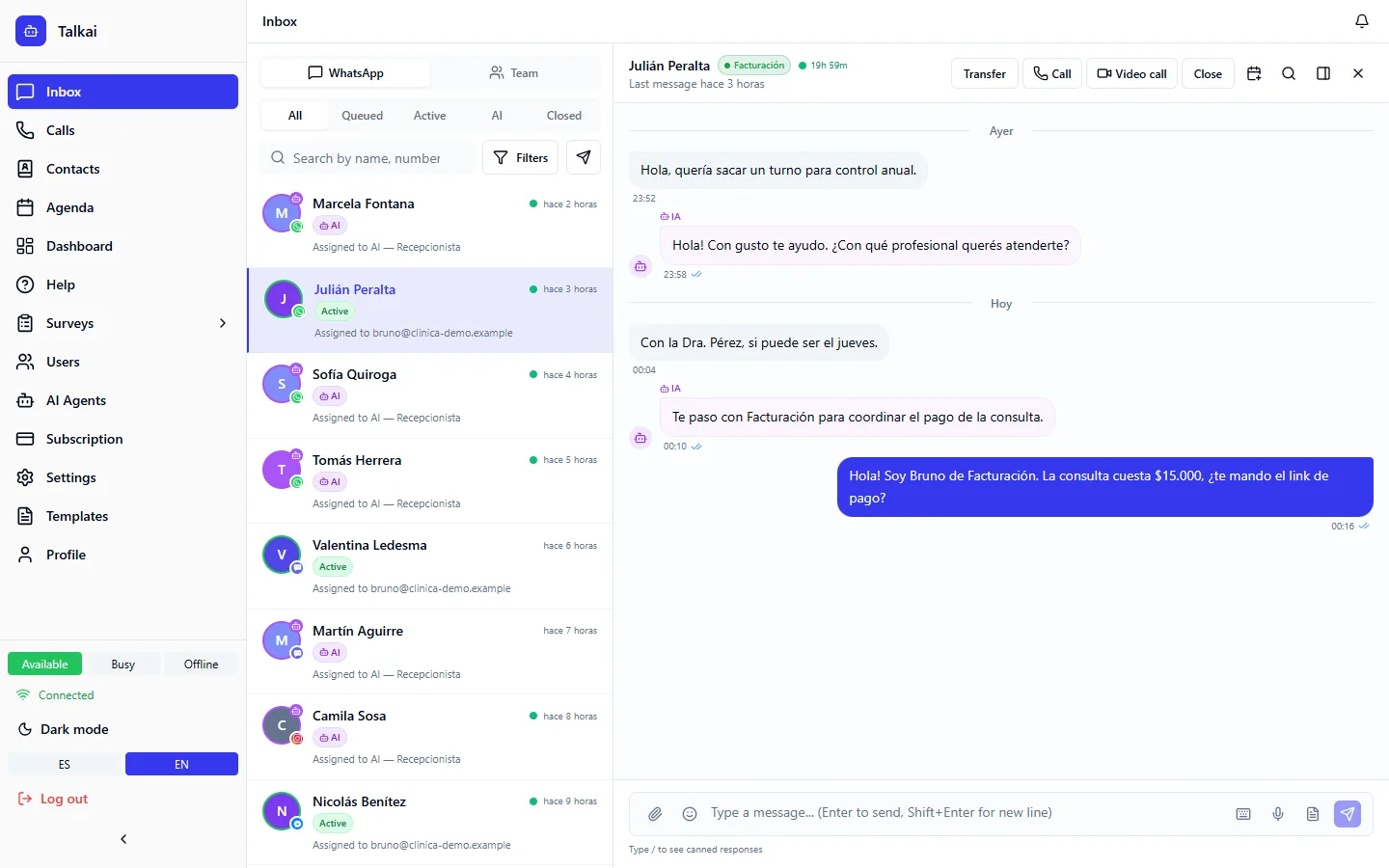
Left panel: conversation list
- Conversations are sorted by last message.
- Each card shows the contact name, last message, time, status and channel.
- The possible statuses are:
- Queued: the contact is waiting for a person.
- Human: a person is handling it.
- Closed: the conversation is over.
My conversations and filters
- My conversations: shows only the ones assigned to you.
- By status: AI, Queued, Human, Closed.
- By department: filters by assigned department.
- Search: by contact name or message content.
Right panel: active conversation
- Shows the history with the contact and the read status (sent, delivered, read).
- You can send text, audio, images and documents.
- Audio transcription: incoming voice messages are transcribed to text. Transcription uses OpenAI Whisper, so an OpenAI key has to be loaded (see AI providers).
- Attachments: use the paperclip to send images (JPG, PNG), videos (MP4), documents (PDF, Word, Excel) and audio. If you configured Amazon S3, files are stored in your bucket; if not, they are stored on the TalkAI server. S3 is optional.
- Quick dictation: the microphone icon records audio and sends it as a voice message. The browser asks for permission the first time.
- Message actions: reply, forward, react and send contact cards (see Contact cards, forwarding and reactions).
Quick actions
- Transfer the conversation to another person or department.
- Close the conversation.
- Labels to classify it (see Labels).
- Quick replies with
/(see Quick replies).
Call over WhatsApp from the header
The conversation header has a Call via WhatsApp button. WhatsApp does not allow calling a customer who has not authorized it, even if the conversation is open: if the permission is missing, TalkAI offers to request call permission and sends the customer a request. Once they accept, you can call them.
AI traces panel
If you are an administrator, the conversation sidebar has an AI traces tab: it shows which tools the AI agent used in that conversation and with what result. It helps you understand why the agent answered the way it did.
SLA and alerts
Queue wait and response time are measured against your account's targets. How to configure them is in SLA and alerts.
24-hour window indicator
Every WhatsApp conversation shows whether you are inside the 24-hour window:
- Green badge with countdown (for example "18h 32m"): the window is open and you can send any kind of message.
- Red "Closed" or "Templates only" badge: more than 24 hours have passed since the contact's last message. You can only send approved templates.
The indicator appears on the list card and in the conversation header.
WhatsApp Business messaging rules
The 24-hour window
| Situation | What you can do |
|---|---|
| The contact wrote less than 24 h ago | Send any message (text, image, audio, etc.) |
| The contact wrote more than 24 h ago | Send only an approved template to reopen the window |
| They never wrote | Start the conversation with an approved template |
- The contact writes to you and the window opens.
- While it is open, you reply freely.
- If 24 hours pass with no other message from them, the window closes.
- To write to them again you send an approved template.
- When the contact replies, the window reopens.
Meta costs
Meta charges WhatsApp messages by category (service, utility, marketing and authentication) and changes the model and rates over time. That is why TalkAI does not publish figures: check the current rate on Meta's WhatsApp Business Platform pricing page (developers.facebook.com/docs/whatsapp/pricing).
Templates: why they are needed
Templates are messages pre-approved by Meta. They are required to start a conversation with a new contact, to resume a conversation after 24 hours and for mass campaigns. Approval can take from minutes up to 24 hours. Rejections are usually due to misleading content or spam, no opt-out option, or variables without clear context.
Sending limits and quality
Meta limits how many different contacts you can message per day based on your number's quality. Quality drops with blocks and spam reports. If it drops, Meta may restrict your number.
Best practices
- Reply fast: it improves your quality.
- Do not spam: send relevant messages.
- Use clear templates with useful information, not just ads.
- Offer an opt-out.
Common mistakes
- I cannot write to the contact: the 24-hour window is closed; send a template.
- The audio is not transcribed: the OpenAI key is missing.